For nearly two decades, SharePoint has been at the core of enterprise collaboration, document management, and intranet solutions. Over time, it has evolved from the Classic SharePoint experience to today’s Modern SharePoint experience.
Many organizations now face a common question: Should we continue with Classic sites, or transition to Modern sites?
The decision is not as simple as flipping a switch, it depends on your existing environment, level of customization, user adoption needs, and your digital transformation strategy. Let’s explore both approaches in depth to help you make the right choice.
What are Classic SharePoint Sites?
Classic SharePoint sites represent the long-standing interface that many enterprises have relied on for years.
Key Characteristics:
Traditional User Interface: A familiar, structured layout that legacy SharePoint users know well.
Modern SharePoint sites were designed to deliver a simpler, faster, and mobile-first experience. They align closely with Microsoft’s cloud-first vision and integrate tightly with Microsoft 365.
Key Characteristics:
Responsive Design: Works seamlessly across desktops, tablets, and mobile devices without extra customization.
Engaging Page Experience: Built with modular webparts that users can easily add or rearrange.
Microsoft 365 Integration: Native connections with Teams, OneDrive, Viva, and Power Platform.
Performance and Security: Faster loading pages and more robust security controls.
Continuous Innovation: All new SharePoint features such as Viva Connections dashboards and modern web parts are released only in the Modern experience.
Challenges with Modern Sites:
Branding is limited compared to Classic, no master pages.
Some complex legacy customizations require redevelopment using SharePoint Framework (SPFx).
Older tools like InfoPath and Designer workflows are not directly supported.
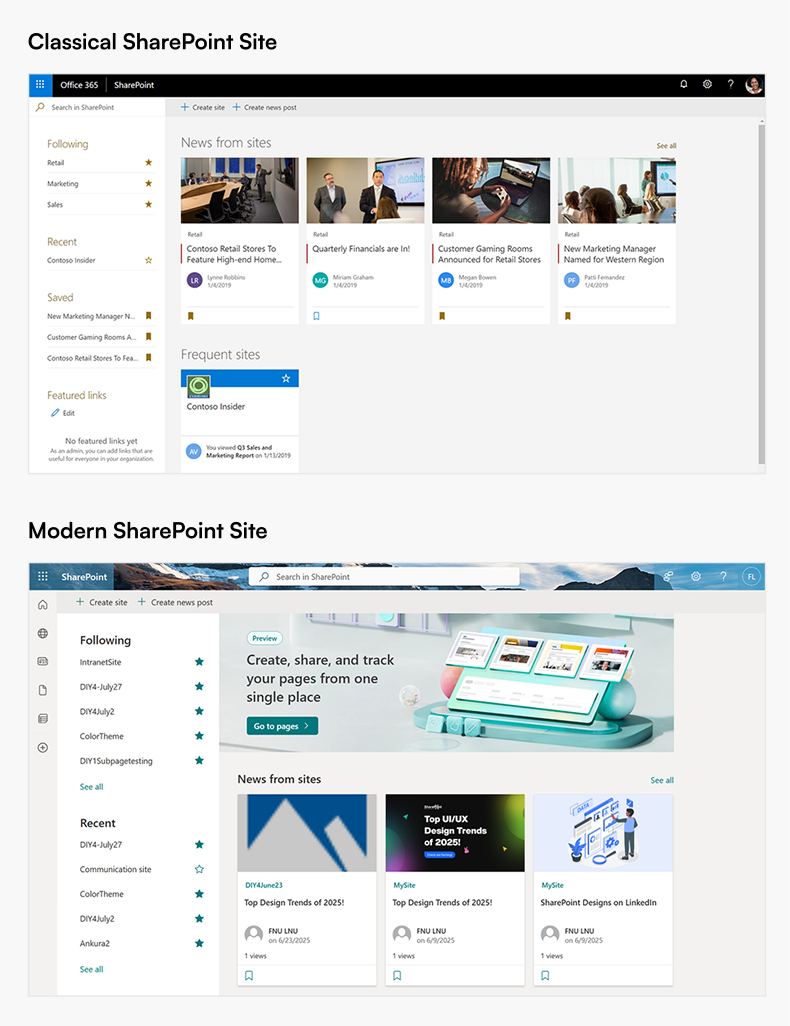
Classic vs. Modern SharePoint: A Comparison
Aspect
Classic SharePoint
Modern SharePoint
Design & UX
Traditional, functional
Clean, responsive, user-friendly
Customization
Master pages, scripts
SPFx web parts, site themes
Ease of Use
Requires technical skills
Non-technical users can build pages
Mobile Support
Limited, add-ons required
Responsive out-of-the-box
Integration
Focused on SharePoint only
Connected with Microsoft 365 ecosystem
Performance
Slower, page-heavy
Lightweight and fast
Workflows & Forms
SharePoint Designer, InfoPath
Power Automate, Power Apps
Future Roadmap
Supported, but static
Microsoft’s focus for new innovations
Ready to migrate? Schedule a Discovery Call with our SharePoint Experts.
You rely heavily on custom master pages or page layouts.
Your business processes depend on legacy workflows or InfoPath forms.
Redesigning existing customizations for Modern is not currently feasible.
When to use Modern Sites
You want a mobile-friendly, user-friendly intranet.
Your organization is adopting or already using Microsoft 365 services.
You want to empower business users to create and manage sites without IT involvement.
You are planning for a future-proof digital workplace with Microsoft’s latest innovations.
Migration Considerations
Transitioning from Classic to Modern is not automatic, it requires thoughtful planning.
1. Audit Current Sites: Identify where Classic features (workflows, scripts, custom branding) are in use.
2. Adopt SPFx: Rebuild custom components using the SharePoint Framework for Modern compatibility.
3. Leverage Power Platform: Replace Designer workflows with Power Automate and InfoPath forms with Power Apps.
4. Plan Change Management: Provide user training and adoption strategies to ensure a smooth transition.
Final Thoughts
Classic SharePoint sites will continue to be supported, but they are becoming a legacy option. All of Microsoft’s ongoing investments, security updates, and new capabilities are focused on the Modern experience.
For most organizations, the Modern approach is the better choice. It delivers a more engaging design, improved performance, stronger Microsoft 365 integration, and long-term sustainability. Classic sites still serve a purpose where legacy systems exist, but if your goal is to build a future-ready digital workplace, Modern SharePoint should be your destination.
In summary:
Classic = legacy and stability, but limited growth.
Modern = innovation, usability, and long-term value.
Power Automate SharePoint Services In today’s fast-paced work environment, keeping everyone updated with the latest news and announcements is crucial. With Power Automate, you can streamline the process of creating news posts in SharePoint directly from Outlook emails. This automation saves time and ensures that important information is shared quickly and efficiently. This blog walks you through the steps to set up this efficient integration. What You’ll Need Power Automate: Included with most Microsoft 365 plans for creating automated workflows. SharePoint Site: The destination site where your news articles will be published. Outlook Account : A Microsoft 365 Outlook account to receive emails. Step-by-Step Guide to Create Your Flow Step 1: Set Up the Trigger Begin by signing in to Power Automate and creating a new flow using the "When a new email arrives" trigger from Outlook. You can set specific conditions to filter the emails that will initiate the flo...
SharePoint Services Ever missed a task because you forgot to follow up? SharePoint reminders and alerts make sure that never happens again. Whether you’re tracking project deadlines or document approvals, you can automate it all no coding required! Need help setting up your SharePoint automation? Get a free consultation today If you use SharePoint to manage your projects, documents, or tasks, you’ve probably faced this problem. you forget to follow up on something important until someone reminds you after it’s already late. That’s where automated reminders and alerts come in handy. They do the remembering for you so you can focus on your real work. In this blog, I’ll show you two simple ways to set up alerts and reminders in SharePoint: 1. Using the built-in “Alert Me” option. 2. Creating smart reminders with Power Automate (Flow). And yes, everything here works with SharePoint Online (Microsoft 365). Let’s get sta...
SharePoint Services Introduction SharePoint introduced flexible layout section , within the flexible section we can move the webpart anywhere on the two-dimensional grid , resizing, over lapping and grouping the webparts, this guide covers how to use flexible sections in SharePoint, from adding web parts to customizing layouts for mobile views. How to add flexible section in SharePoint Page Just like adding other sections, click the Section button . This will open the Section toolbox. In the toolbox, you will see the Flexible Section listed first. Click on Flexible to add a Flexible Section to your page. How to add web parts inflexible sections After adding a Flexible Section to your page, web parts cannot be added directly. Instead, you need to drag them from one of the Column Layouts into the Flexible Section, duplicate an existing web part, or use the Toolbox pane . The Toolbox pane, located on the right side, allows you to easily add web pa...


Comments
Post a Comment