How to create a SharePoint site-A Step-by-Step Guide

A well-structured intranet is essential for organizations to enhance communication, foster collaboration among users, and efficiently manage important documents. Microsoft offers a powerful and flexible platform called SharePoint, which enables the creation of exclusive intranets tailored to an organization's needs using both built-in and customizable web parts. This guide will walk you through building a simple intranet using only the out-of-the-box components available in SharePoint Online.
Step 1: Site Creation
Follow these steps to create your SharePoint intranet:
1. Navigate to the SharePoint Admin Center:

2. Choose the Type of Site:
You can select from Team Site or Communication Site based on your needs:

3. Select a Template:
SharePoint offers predefined templates like:
Choose any of these templates to get started quickly or select the Blank Template to design your intranet from scratch.
4. Configure Site Details:
5. Set Language and Timezone:
Step 2: Modifying Site Appearance in SharePoint

Step 3: Adding Web Parts in SharePoint
SharePoint provides the flexibility to add both Out-of-the-Box (OOTB) Web Parts and custom web parts to enhance site functionality.
Now, let's explore a customized web part template sample to understand how we can build and integrate a tailored solution.
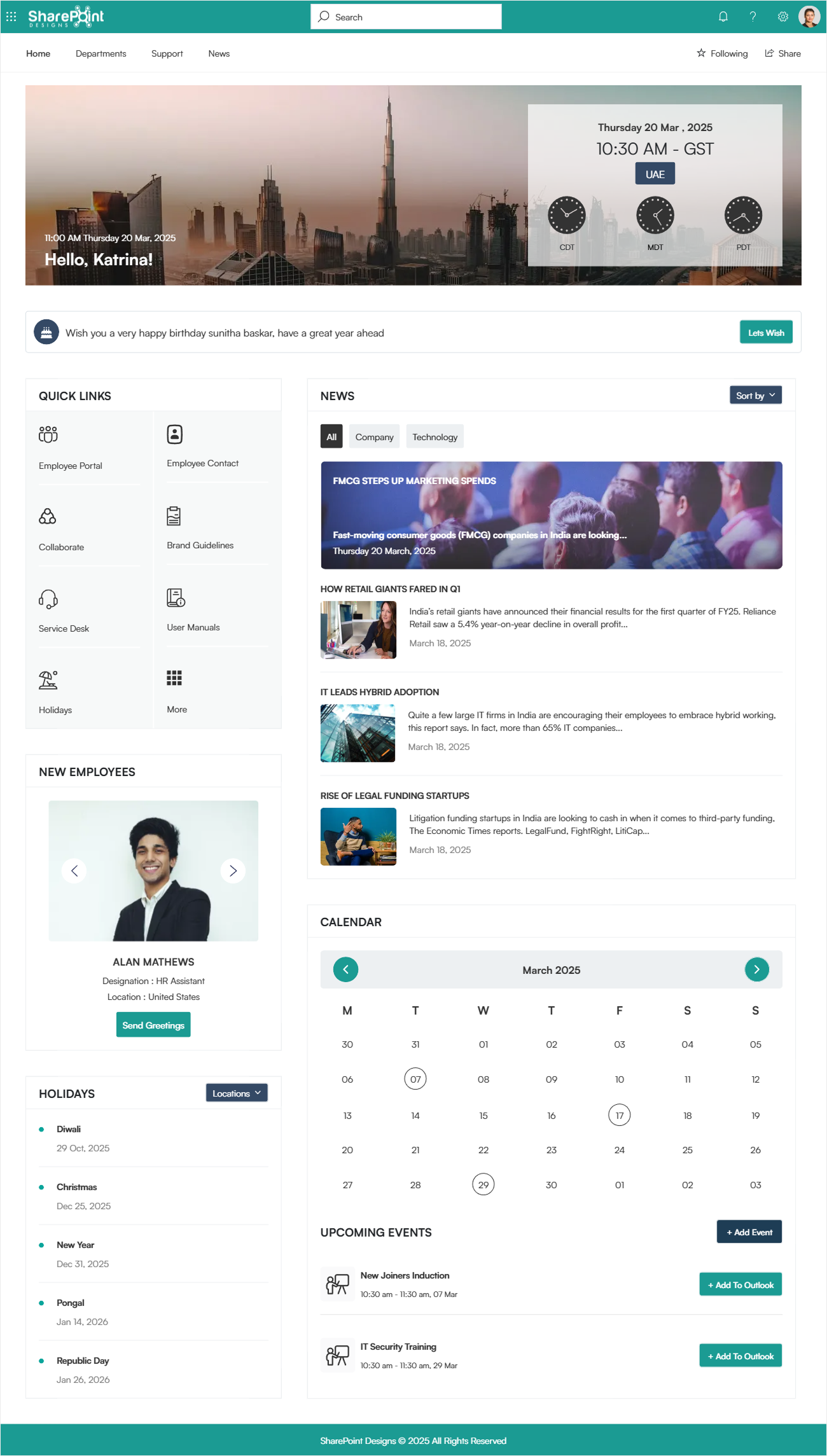
This SharePoint design template includes various components to enhance user experience and streamline organizational communication. Below is the purpose of each component:
1. Customized Suite Bar
2. Top Navigation
3. Welcome Banner
4. Let’s Wish
5. Quick Links
6. News
7. New Employees
8. Holiday
9. Calendar
10. Footer
To learn more about this template or explore different SharePoint design templates, Click Here.
Implement Intranet for your Company in just 2 Days!!!
Conclusion
Building an intranet in SharePoint Online is a strategic move for organizations looking to enhance collaboration, communication, and document management. By leveraging out-of-the-box webparts, companies can quickly create a functional and engaging intranet tailored to their needs.
From site creation and customization to adding essential components like news, quick links, and employee engagement features, SharePoint provides a flexible and scalable solution. Whether using a predefined template or designing from scratch, businesses can optimize their intranet to improve productivity and connectivity across teams.
With the right setup, your SharePoint intranet can be come a central hub for information sharing and workplace engagement.
Ready to transform your organization’s digital workspace?
Additional Resources
How to create a document library in SharePoint
How to create SharePoint list
SharePoint webparts for modern intranet


Comments
Post a Comment